An appointment reminder template that patients actually answer does three things: it names your practice, gives the day, time and place, and ends with a simple reply prompt such as “Reply 1 to confirm, 2 to reschedule.” Keep it near 160 characters and leave clinical details out.
Below are 25 appointment reminder text templates grouped by when they go out, four in Spanish.
Key Takeaways
- The best appointment reminder texts name the practice, give the day, time and place, and end with a reply prompt such as “Reply 1 to confirm, 2 to reschedule.”
- Keep each text near 160 characters, leave out anything clinical, and let patients reschedule inside the text thread instead of following a link.
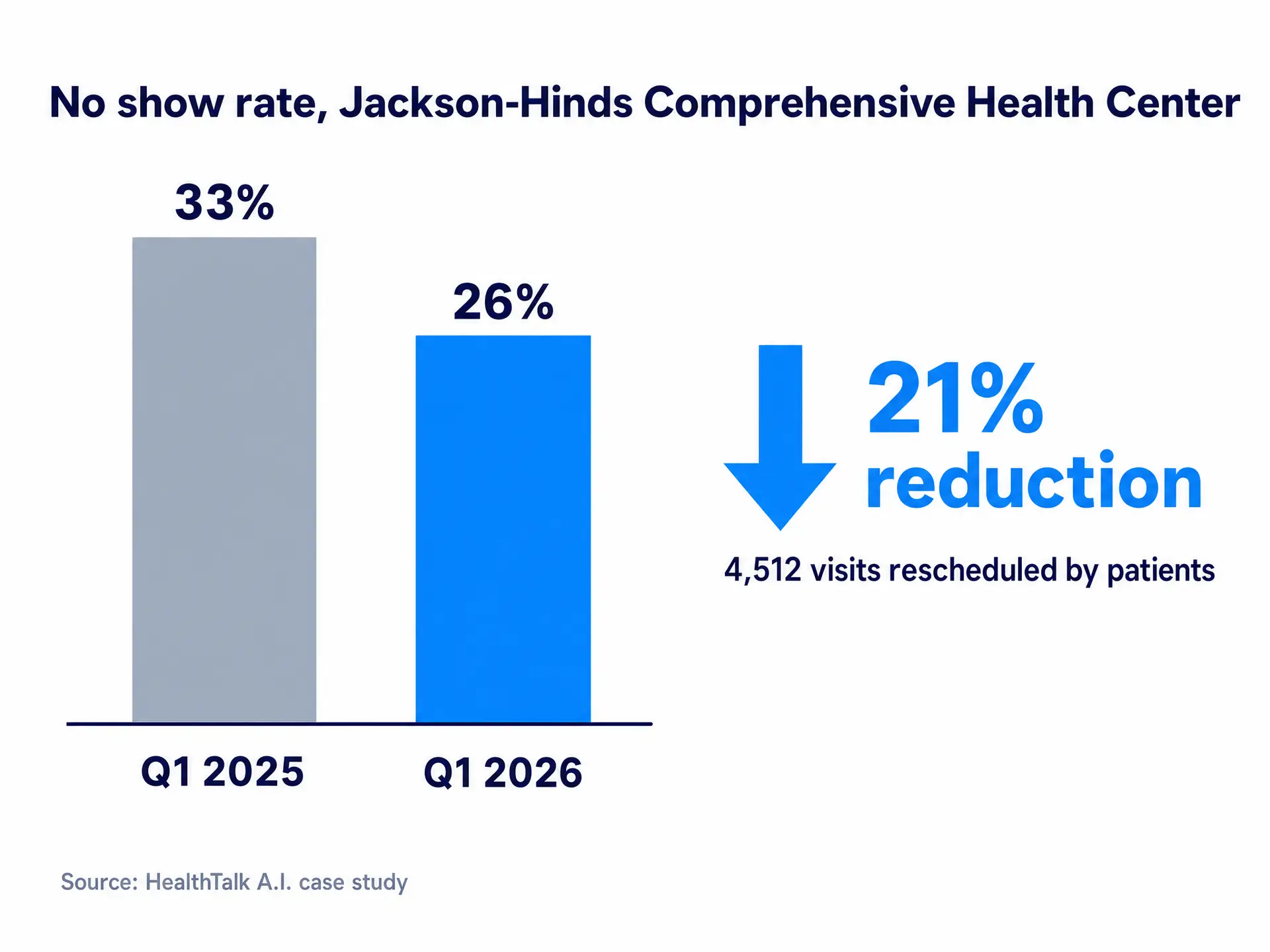
- Jackson-Hinds Comprehensive Health Center cut its no show rate from 33% to 26%, a 21% reduction, after adding self rescheduling and automated no show notifications.
What Makes an Appointment Reminder Template Work
A good appointment reminder text is a short conversation:
- Name the practice early. Patients ignore texts they can’t place.
- Give only logistics. Day, date, time, location, provider. Nothing clinical.
- Ask one question. 1, 2, YES, NO or a single letter is all you need.
- Fit one segment. A standard SMS segment holds 160 characters.
Spanish needs one extra check. Letters such as á, í and ó sit outside the standard GSM character set, so one of them switches the message to Unicode, where a segment holds only 70 characters. The Spanish templates below avoid á, í, ó and ú; test any edits before going live.
Why Reply Prompts Beat Links
A link sends the patient to a browser and a form, so many close the text and forget. A reply takes seconds, and every answer tells your front desk who is coming, which a one way blast never does. Here is how interactive two way appointment reminders work.
Making it easy to move a visit, instead of skipping it, shows up in the numbers. Jackson-Hinds Comprehensive Health Center, Mississippi’s largest FQHC, cut its no show rate from 33% to 26% between the first quarter of 2025 and the first quarter of 2026 after adding HealthTalk A.I. self rescheduling and automated no show notifications. That is a 21% reduction in no shows, with 4,512 visits rescheduled by patients themselves.
Booking and the Days Before
Booking Confirmation
1. Standard confirmation
Hi [First Name], you’re booked with [Provider] at [Practice Name] on [Day], [Date] at [Time]. Reply 1 to confirm, 2 to reschedule, STOP to opt out.
2. Confirmation with location
[Practice Name]: Your visit is set for [Date] at [Time] at [Location]. Does that still work? Reply YES or NO.
Several Days Out
3. Three day reminder
Hi [First Name], a reminder from [Practice Name]: you have a visit on [Day], [Date] at [Time]. Reply 1 to confirm, 2 to reschedule.
4. One week reminder
[Practice Name]: [First Name], your appointment with [Provider] is next [Day] at [Time]. Need a different time? Reply 1 to keep it, 2 to change it.
24 Hours Out
5. Day before reminder
Hi [First Name], see you tomorrow at [Time] with [Provider] at [Location]. Reply 1 to confirm, 2 to reschedule.
6. Day before with a nudge
[Practice Name] reminder: tomorrow, [Date] at [Time]. Can’t make it? Tell us now and we’ll find a better time. Reply YES to confirm or NO to change it.
7. Day before reminder (Spanish)
Hola [First Name], le recordamos su cita en [Practice Name] mañana a las [Time]. Responda 1 para confirmar o 2 para cambiar la cita.
English: A reminder of your visit at [Practice Name] tomorrow at [Time]. Reply 1 to confirm or 2 to change it.
Visit Day Templates
Same Day
8. Morning of the visit
Good morning, [First Name]. We’ll see you today at [Time] at [Location]. Still coming? Reply YES or NO.
9. Two hours before
Hi [First Name], [Practice Name] here: are you still coming in at [Time] today? Reply 1 for yes, 2 if you’re running late, 3 to reschedule.
Arrival or Prep Instructions
10. Arrival instructions
[Practice Name]: For your [Time] visit, please arrive 15 minutes early and check in at the front desk at [Location]. Reply 1 to confirm, 2 to reschedule.
11. Prep reminder (generic)
Hi [First Name], your [Date] visit has a few prep steps. Reply INFO and our team will send them, 1 to confirm, or 2 to reschedule.
New Patient and Telehealth Templates
New Patient
12. Bring ID and insurance card
Welcome to [Practice Name], [First Name]! For your first visit on [Date], please bring a photo ID and your insurance card. Reply 1 to confirm, 2 to reschedule.
13. Finish intake forms
Hi [First Name], please complete your new patient forms before your [Date] visit so check in is quick. Reply 1 when they’re done, 2 if we should resend them.
14. New patient reminder (Spanish)
[Practice Name]: Para su primera cita el [Date], traiga un documento de identidad con foto y su tarjeta de seguro. Responda 1 para confirmar o 2 para cambiarla.
English: For your first visit on [Date], bring a photo ID and your insurance card. Reply 1 to confirm or 2 to change it.
Telehealth Visit
15. Video visit reminder
Hi [First Name], your video visit with [Provider] is [Day] at [Time]. Please be somewhere quiet and private. Reply 1 to confirm, 2 to reschedule.
16. Fifteen minutes before
[Practice Name]: Your video visit with [Provider] starts in 15 minutes. Reply 1 if you’re ready, 2 if you’re having trouble connecting.
When Patients Go Quiet or Need a New Time
No Reply Follow Up
17. First follow up
Hi [First Name], we haven’t heard back about your visit on [Date] at [Time]. Reply 1 to confirm or 2 to reschedule.
18. Final check
[Practice Name]: We’re still holding your [Time] visit tomorrow, [First Name]. A quick reply helps us plan. Reply 1 to keep it, 2 to change it.
Reschedule Flow (Patient Replied 2)
19. Offer open times
No problem, [First Name]. Here are the next open times with [Provider]: A) [Day] [Time] B) [Day] [Time] C) [Day] [Time]. Reply A, B or C.
20. Offer open times (Spanish)
Con gusto, [First Name]. Estos son los horarios disponibles con [Provider]: A) [Day] [Time] B) [Day] [Time] C) [Day] [Time]. Responda A, B o C.
English: Here are the open times with [Provider]. Reply A, B or C.
21. New time confirmed
You’re all set, [First Name]. Your new visit is [Day], [Date] at [Time] at [Location]. Reply 1 to confirm or 2 if you need another time.
After a Missed or Overdue Visit
Missed Appointment or No Show
22. Same day no show
Hi [First Name], we missed you today at [Practice Name] and hope all is well. Reply 1 to book a new time or 2 if you’d like a call.
23. Same day no show (Spanish)
Hola [First Name], hoy no pudo venir a su cita en [Practice Name]. Esperamos que esté bien. Responda 1 para elegir otra fecha o 2 para recibir una llamada.
English: You missed today’s visit; we hope you’re well. Reply 1 for a new date or 2 for a call.
Overdue Recall
24. Due for a visit
Hi [First Name], [Practice Name] here. Our records show you’re due for a visit with [Provider]. Reply 1 to see open times or 2 if you’d like a call.
25. Yearly visit nudge
[Practice Name]: [First Name], it’s time for your yearly visit and we have openings this month. Reply 1 to see times, 2 for a later month, STOP to opt out.
HIPAA Safe Wording for Doctor Appointment Reminder Texts
HHS says appointment reminders are part of treatment and can be made without the patient’s authorization. The risk is what a text reveals if someone else sees the phone.
- Minimum necessary. Who, when and where is enough.
- Nothing that implies a condition. No diagnosis, procedure or test names, and no specialty names that hint at the reason for the visit.
- Practice name, not a sensitive department. “[Practice Name]” reads safer on a lock screen than a behavioral health clinic’s name.
- Honor confidential communication requests. Under 45 CFR 164.522(b), providers must accommodate reasonable requests to be contacted by alternative means or at alternative locations. If a patient asks for no texts or another number, flag it everywhere.
- Easy opt out. Include “Reply STOP to opt out” early in a series and stop texting once a patient sends STOP. CTIA carrier guidance and FCC consent revocation rules both point that way; confirm details with your vendor or counsel.
Our guide to HIPAA compliant patient texting covers the rest, from encryption to Business Associate Agreements.
Put These Templates to Work with HealthTalk A.I.
Templates only help if someone handles the answers. HealthTalk A.I. sends reminders like these automatically, in each patient’s preferred language, through its two way patient communication platform.
When a patient replies to confirm or chooses a new time, the appointment is confirmed or moved in your EHR through bidirectional sync with 90+ EHR and practice management systems. AI patient scheduling offers open times inside the text thread, and staff can step into any conversation.
Still sending one way reminders? See how HealthTalk A.I. would run yours.
Request a Demo