
If your practice is evaluating AI, one of the first questions should be: Can this tool be used with patient information without creating unnecessary HIPAA risk?
That question is becoming more important as AI moves beyond simple note taking and begins handling patient calls, scheduling, outreach, intake, and other workflows that may involve protected health information.
But there is an important distinction to understand: there is no such thing as a “HIPAA certified” AI tool. HHS does not certify technology products as HIPAA compliant, nor does it officially recognize private HIPAA certifications under the Security Rule.
Instead, whether an AI solution can be used compliantly depends on a combination of the technology, the vendor, and how your organization deploys it.
For practices evaluating HIPAA compliant AI, that means looking closely at three things: the contracts behind the platform, the safeguards built into it, and how patient information is handled in real world workflows.
A HIPAA compliant AI agent is harder to vet than a plain texting tool because it reaches further. It reads from your EHR, talks with patients on its own, and usually depends on outside model and hosting providers. Each of those is a place PHI can go. For channel basics, our guide to HIPAA compliant patient interactions covers texting, web chat and voice. This post goes one layer deeper, into the AI itself.
Key Takeaways
- HHS does not certify AI tools or recognize private HIPAA certifications, so compliance depends on the contracts, the safeguards and how your organization uses the tool.
- Get a BAA that reaches every subcontractor down to the AI model provider, and put the answer on model training and data retention in the contract, not a sales call.
- Ask for exportable audit logs, clear human handoff, and a current SOC 2 Type 2 report whose scope includes the AI product.
The HIPAA Compliant AI Checklist
For AI in healthcare, HIPAA questions come back to the rules that govern any vendor handling PHI for you. Here is what to ask, what a good answer looks like, and the red flag to listen for.
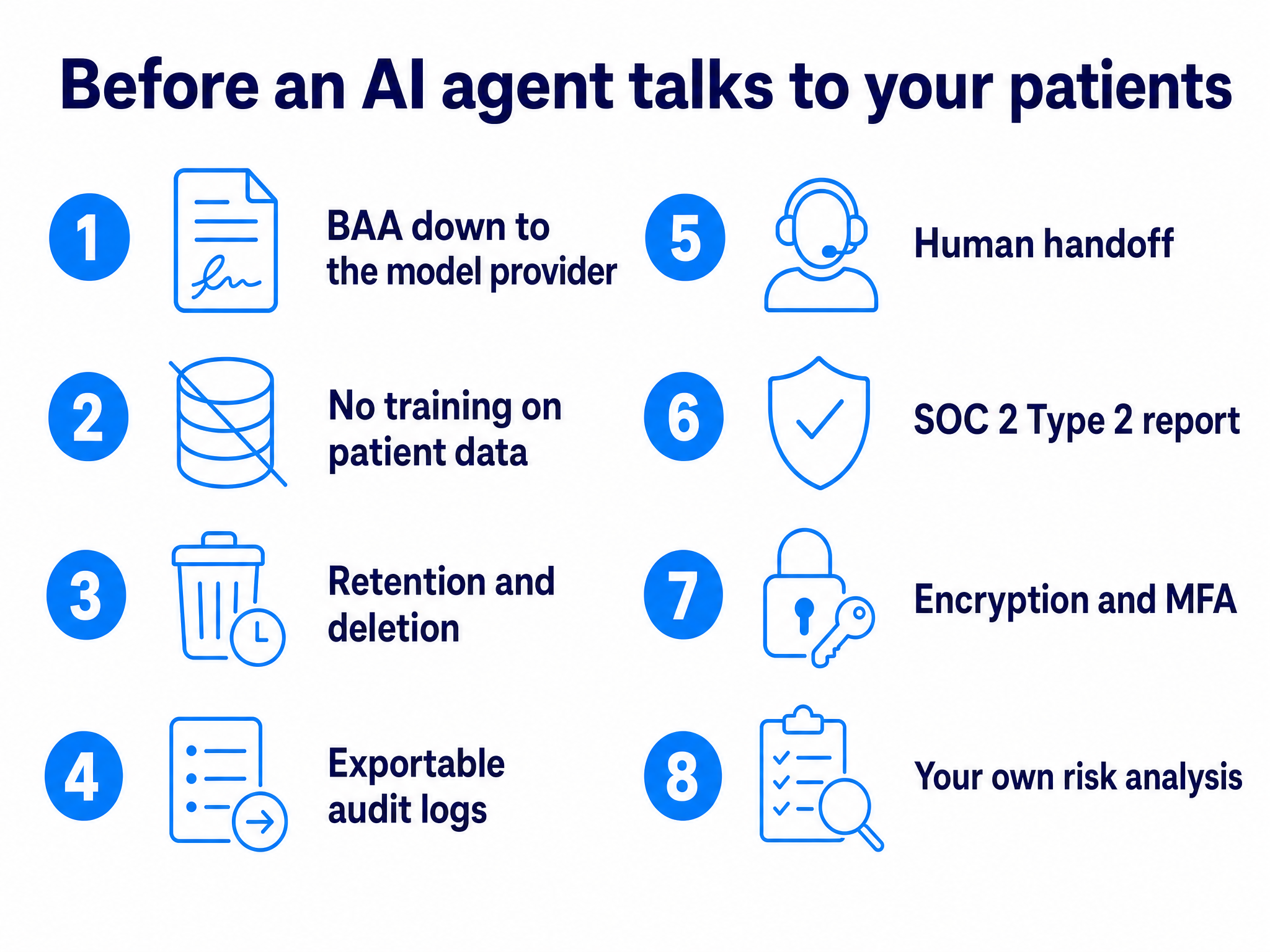
1. A BAA That Reaches All the Way to the Model
Ask: Will you sign a Business Associate Agreement that covers this AI product? Which subcontractors touch PHI, including your AI model provider and hosting provider, and do you have BAAs with each?
Good answer: A BAA that names the AI features, plus a subcontractor list with downstream BAAs in place. This is a legal requirement. Under 45 CFR 164.502(e) and 164.308(b), a business associate may pass PHI to a subcontractor only under a written agreement with the same protections, and HHS treats a cloud provider a vendor relies on as a business associate in its own right.
Red flag: The vendor won’t name its model provider, or the BAA covers messaging but not the AI.
2. Whether Patient Data Trains the Model
Ask: Is PHI, or anything derived from our conversations, used to train or improve your models or your provider’s models?
Good answer: A clear no, written into the BAA or master agreement and covering every model provider downstream. The BAA is where permitted uses of PHI get defined, so that is where this answer belongs.
Red flag: “We don’t do that” on a sales call with nothing on paper, or contract language allowing “deidentified” or “aggregated” data for “product improvement” with no definition.
3. Retention and Deletion of Recordings, Transcripts and Chat Logs
Ask: What do you store (call audio, transcripts, chat logs, the AI’s inputs and outputs), for how long, and can we set the period? What happens to it when we leave?
Good answer: A written schedule for each data type, deletion you can configure, and a commitment to return or destroy PHI at termination, which HHS says a BAA must require where feasible. Ask whether the model provider keeps its own logs, too.
Red flag: “We keep everything so the AI keeps getting smarter.”
4. Audit Logs You Can See and Export
Ask: Do your logs show who and what touched PHI, including actions the agent took on its own? Can we export them?
Good answer: Timestamped records of every staff user and every agent action: what it read from the EHR, what it wrote back, what it sent the patient. The Security Rule’s audit controls standard at 164.312(b) requires mechanisms that record and examine activity in systems holding ePHI.
Red flag: Logs available only through a support ticket.
5. Human Handoff and Escalation
Ask: Can staff see every conversation and take over at any point? What triggers an escalation? What happens when a patient asks a clinical question?
Good answer: A shared inbox with live visibility, clear escalation rules (symptoms, urgent language, a request for a person), and an agent that sticks to administrative work and routes clinical questions to your team instead of giving medical advice. This applies to an AI voice agent answering after hours calls as much as to chat.
Red flag: “The AI handles everything end to end.”
6. Independent Evidence: SOC 2 Type 2 and Pen Testing
Ask: Can we see your SOC 2 Type 2 report and your latest third party penetration test summary?
Good answer: A current Type 2 report, usually shared under NDA, with a scope that includes the AI product. A SOC 2 Type 1 only checks whether controls were designed properly at a single point in time. A Type 2 tests whether they actually operated over a review period. HHS notes HIPAA does not expressly require a cloud vendor to hand over documentation of its security practices, so make access part of the deal.
Red flag: Only a Type 1, an expired report, or a scope that leaves out the AI.
7. Encryption, Access Controls and MFA
Ask: How is PHI encrypted at rest and in transit? Is access role based? Is MFA required for every user?
Good answer: Specifics, such as AES 256 at rest and TLS 1.2 or higher in transit, permissions scoped by role, and MFA enforced rather than optional.
Red flag: “Bank level encryption” with no standards named.
8. Your Own Side of the Work
Ask yourself: Is this tool in our HIPAA risk analysis, and does the agent see only what it needs?
Good answer: You document the agent’s data flows in your Security Rule risk analysis and apply the minimum necessary standard to its access. A scheduling agent needs appointment types and open slots, not the full chart. Signing with a compliant vendor does not move your own obligations onto them.
Red flag: An integration that gives the agent full EHR read access by default.
How HealthTalk A.I. Answers the Checklist
HealthTalk A.I. signs a BAA with every client. It has achieved SOC 2 Type 2 certification, and the report is available to current and prospective customers under NDA. PHI is encrypted at rest and in transit with AES 256 and TLS 1.2+, access is role based, MFA is required, audit logging is comprehensive, and third party penetration tests run regularly. Across text, web chat and voice AI, staff see every conversation and can step in at any point.
For model training and retention, ask us directly and hold us to the standard in this post: the answer belongs in the contract. If you are weighing AI automation for patient communication, start with the HealthTalk A.I. Trust Center and request the SOC 2 report before your first demo.
Want to walk through this checklist with the HealthTalk A.I. team?
Request a Demo