The most reliable way to get more patient reviews is to ask by text soon after the visit, with one direct link to your review page, and to follow up quickly when a patient tells you something went wrong.
When reviews come in, reply to each one without confirming the reviewer is a patient or mentioning their care, and offer to continue the conversation offline. That is the core of healthcare reputation management, and all of it can become part of your front office routine this month.
Key Takeaways
- Send a brief post-visit check-in text to catch concerns early and promptly schedule follow-up calls.
- Ask for reviews by text soon after the visit, with one direct link to your review page.
- Never confirm that a reviewer is a patient or discuss their care in a public reply. HHS has settled with practices over exactly that, including $30,000 from Manasa Health Center in 2023.
Why Patient Reviews Matter
Before most new patients call, they search. Your star rating, review count and how recent those reviews are sit right next to your phone number. Reviews also surface things your team may never hear in person, which is why good medical reputation management treats them as feedback, not just marketing.
Most practices do not have a review problem. They have an asking problem. Satisfied patients rarely post on their own. A short, well timed text changes that.
How to Get Patients to Leave Reviews
Ask Soon After the Visit
Send the request the same day, ideally within a few hours, while the visit is still fresh. A text reaches patients after they have left, when they have a quiet minute and nobody is standing over them.
Name the Provider
“Thanks for seeing Dr. Patel today” feels personal. “Thank you for your recent visit” feels like a form letter. Naming the provider in your message is fine. Telling patients what to write is not. Let them say whatever they want in their own words.
Send One Direct Link
Link straight to the review form, not your homepage. Every extra step loses people.
Keep It Short
Two or three sentences. No reason for the visit and no health details of any kind.
Review Request Text Templates
Swap in your own details. [review link] is your direct Google or Healthgrades review URL.
1. Same day, short
Hi [First name], thanks for seeing Dr. [Last name] at [Practice] today. If you have a minute, would you share a quick review? [review link]
2. With a private line for concerns
Hi [First name], thank you for visiting [Practice] today. We would be grateful for a review: [review link]. If anything about your visit needs our attention, just reply to this text and our team will follow up.
3. Next morning
Good morning [First name]. Thanks again for coming in yesterday. Reviews help neighbors find care they can trust. Would you add yours? [review link]
4. For parents and caregivers
Hi [First name], thanks for trusting [Practice] with your family’s care today. If you’re willing, a short review helps other parents find us: [review link]
5. One gentle reminder
Hi [First name], in case our last text got buried: if you’d like to share your experience with [Practice], here is the link. [review link] Thank you either way.
6. Spanish
Hola [Nombre], gracias por su visita de hoy con el Dr. [Apellido] en [Consultorio]. Si tiene un minuto, ¿nos deja una reseña? [review link] Si algo de su visita necesita nuestra atención, responda a este mensaje.
English meaning: “Hi [Name], thank you for your visit today with Dr. [Last name] at [Practice]. If you have a minute, would you leave us a review? If anything about your visit needs our attention, reply to this message.”
Send the reminder once, then stop.
Healthcare Reputation Management Starts with Service Recovery
Reviews are only half of your reputation. The other half is what happens when a visit goes wrong. A frustrated patient who never hears from you may tell friends, switch practices or post about it. A patient who gets a quick, genuine call has a reason to give you another chance.
A short post visit check in text catches those moments while there is still time to fix them. Keep it to two or three questions, such as how the visit went and whether anything needs your attention. Our guide to patient satisfaction surveys covers how to write questions patients actually answer.
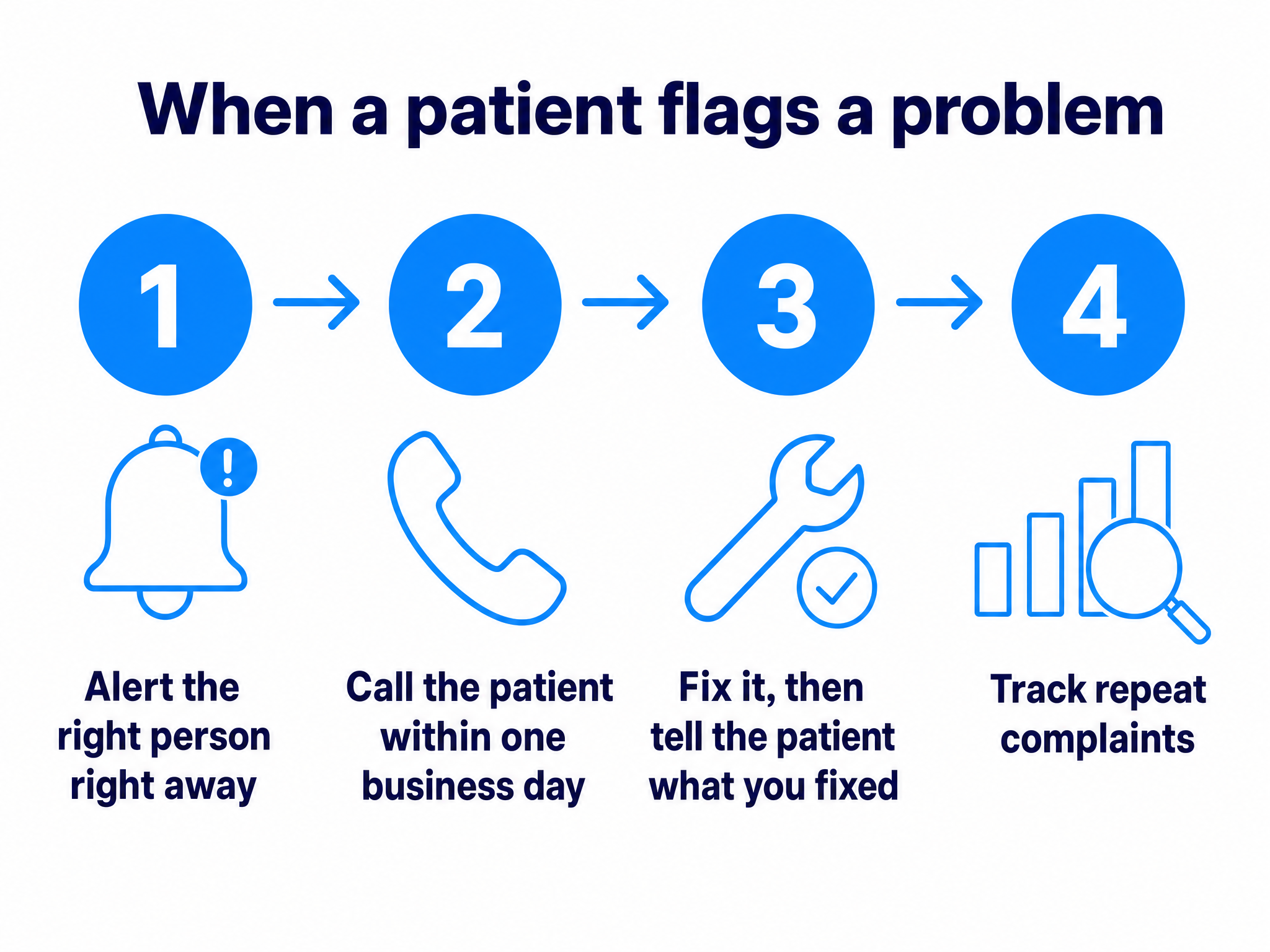
When a patient flags a problem:
- Alert the right person right away. A complaint that waits for a weekly report has already gone cold.
- Schedule call within one business day. A real conversation does more than a scripted apology.
- Fix what you can, then tell the patient what changed. Closing the loop is what turns a complaint into loyalty.
- Track the themes. If wait times or billing questions keep coming up, fix the process so the next patient never has to complain.
Service recovery and review requests work together. The same text program that asks for reviews is the one that surfaces problems early, so your team hears about them first.
How to Reply to Reviews Without Violating HIPAA
A review is public. The patient’s relationship with your practice is not. A reply that confirms someone is your patient, or mentions their visit, diagnosis or treatment, can disclose protected health information, even when the patient described everything first.
HHS’s Office for Civil Rights has enforced this:
- Elite Dental Associates (2019): paid $10,000 to settle OCR’s investigation after disclosing patients’ information in replies to Yelp reviews.
- Manasa Health Center (2023): a New Jersey provider, paid $30,000 after disclosing patient information in response to negative online reviews.
In both cases, the patient wrote the review. The practice got in trouble for what it wrote back. For a wider view of what HIPAA expects across every channel, see our guide to HIPAA compliant patient interactions.
Rules for Every Reply
- Never confirm or deny that the reviewer is a patient.
- Never repeat or respond to clinical details, even ones the reviewer shared.
- Don’t address the reviewer by name.
- Never argue the facts in public. Offer a phone number and a named contact, and take it offline.
- Use approved templates, and have a second person check anything unusual before it posts.
Safe Reply Templates
Positive review
Thank you for taking the time to share this. Our team works hard to make every visit a good one, and kind words like these mean a lot to us.
Negative review
We’re sorry to read this. We take every concern seriously, but privacy rules keep us from discussing any individual situation online. Please call our practice manager, [Name], at [phone] so we can listen and help.
Review that names a treatment or condition
Thank you for your feedback. To protect everyone’s privacy, we never discuss health details in public, even when they have been shared with us first. If you’d like to talk, please call [phone] and ask for [Name or role].
Put the Ask on Autopilot with HealthTalk A.I.
The hard part is consistency: checking in after every visit, catching concerns quickly and answering reviews the same week. HealthTalk A.I.’s post visit follow up and reputation tools handle the routine work with automated post visit satisfaction surveys, real time feedback alerts for staff, service recovery workflow triggers, one click review links for Google, Healthgrades and others, review monitoring and alerts, and provider level reputation tracking. If you’d like to see how that fits your practice, the HealthTalk A.I. team is happy to walk you through it.
Want to see automated check ins, review requests and real time feedback alerts in action?